
UPS Power Supply Selection for IT Infrastructure
Updated: Jul 17

Choosing the right uninterruptible power supply (UPS) for your business IT environment is not a one-size-fits-all exercise. This guide walks through the practical steps of selecting, sizing, and deploying a UPS to protect the equipment your operations depend on, from servers and networking gear to POS terminals and critical business systems. Businesses evaluating broader power backup solutions can use this guide as a practical starting point.
Key Takeaways
An uninterruptible power supply (UPS) keeps critical IT equipment running during power cuts, voltage dips, and surges, giving you time to safely shut down or continue operations.
Businesses should size a UPS based on total load (in watts and volt-amperes), required runtime (typically 5–30 minutes), and the physical environment.
The main UPS topologies — standby, line interactive, and online double-conversion — suit different budgets, power quality needs, and levels of criticality. Many models add "smart" network management features on top of these topologies.
APC UPS solutions are widely used for protecting servers, networking gear, and other IT infrastructure.
What Is a UPS Power Supply?
A UPS power supply is a device that provides immediate battery backup when utility power fails or fluctuates outside safe parameters. It sits between the main supply and your connected equipment, continuously monitoring the incoming power and switching to battery power the moment a disruption is detected.
Unlike a simple surge protector, which only clamps voltage spikes, a UPS delivers both surge protection and short-term battery backup with regulated output. Many UPS units also perform power conditioning and automatic voltage regulation to smooth out brownouts and minor fluctuations before they reach your hardware.
Electrical Fundamentals for UPS Evaluation
Understanding some electrical basics can help when evaluating UPS options:
Watts vs volt-amperes (VA): Watts measure real power consumed; VA is apparent power. The relationship is Watts = VA × power factor. Most modern IT loads have a power factor of 0.8–0.9.
Transfer time: The milliseconds a UPS takes to switch from mains to battery. Online double-conversion units have zero transfer time; line interactive models typically switch in 5–8 ms, and standby units in roughly 4–12 ms depending on design.
Topology | Transfer Time | Best For |
Standby (offline) | 4–12 ms | Desktops, basic peripherals |
Line interactive | 5–8 ms | Small server rooms, network racks |
Online double-conversion | 0 ms | Critical servers, sensitive equipment |
In a typical Singapore office, a line interactive or online UPS can keep a small rack of servers alive for 10–15 minutes during a power outage — enough time for a graceful shutdown or for mains to recover. Businesses running rack-based infrastructure may also want to review server rack solutions for equipment planning and deployment.
UPS units are available in a wide range of power ratings, from compact units around 300 VA for basic office equipment up to large multi-kVA rack systems and beyond for data centres and industrial applications.
Why Businesses Use UPS Protection
A UPS prevents sudden shutdowns of servers, switches, point-of-sale terminals, and scanning equipment during power loss. The consequences of an unprotected outage extend well beyond inconvenience:
Data corruption: Databases can lose in-flight transactions during an abrupt shutdown, damaging inventory or customer records. Any interruption mid-write can corrupt batch uploads.
Hardware damage: Network switches and firewalls store important system settings and updates in built-in memory called NVRAM. If the power goes off while this information is being saved, the process may stop halfway. This can damage the startup software (bootloader), causing the device to fail to boot and become unusable after restarting.
Compliance gaps: Healthcare, government, and logistics sectors rely on accurate tracking data. A UPS ensures audit trails remain intact, protecting critical data from gaps.
Operational continuity: Even brief outages can disrupt cloud access, VoIP calls, or payment processing. UPS units maintain uptime for essential devices like internet routers and firewalls, preserving connectivity.
Even small offices benefit. Protecting your internet router, core switch, and one main workstation with a compact smart UPS unit ensures cloud applications and VPN access remain available during brief outages.
How UPS Supports IT Infrastructure
Consider the typical infrastructure chain in a business network: ISP modem → firewall → core switch → wireless access points → end devices. If any upstream component loses power, every downstream device goes dark — including kiosks, scanners, and workstations. A UPS at the network core keeps this chain powered.
UPS units integrate into server racks and network closets without changing the existing power supplies inside equipment. Line interactive and online UPS systems provide cleaner output for sensitive equipment such as access control servers.
Common Risks of Power Disruption
Power problems go beyond complete blackouts. Common power disturbances include:
Brownouts and voltage sags lasting seconds to minutes
Power spikes from lightning or load switching
Frequency variations in areas with unstable grid supply
Short-duration flickers from nearby heavy equipment or utility faults
These issues can corrupt databases, damage switching power supplies in printers and peripherals, and cause network switches to lose configuration. A UPS with integrated surge protection reduces the impact of lightning-induced surges on connected devices, which is especially relevant in tropical climates prone to thunderstorms.
If your business has experienced repeated breaker trips, unexplained PSU failures, or firmware corruption in networking gear in recent months, these are strong indicators that your UPS protection may be overdue.
What to Consider When Choosing a UPS Power Supply
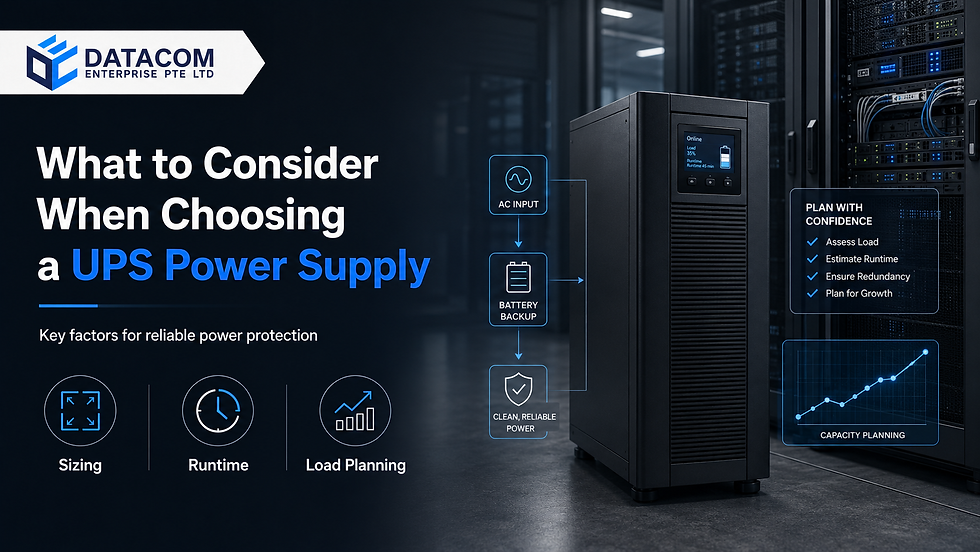
Proper UPS selection is about matching capacity, runtime, and topology to real business requirements — this is where UPS planning for business becomes critical. The main factors include total equipment load, required runtime, physical environment, power quality expectations, manageability, and future expansion plans. Overspecifying runtime leads to oversized battery banks and unnecessary cost, while underspecifying risks costly interruptions during outages.
Total Equipment Load
Start by inventorying every device that needs protection:
Servers and storage arrays
Core switches (especially PoE models drawing 150–600 W)
Wi-Fi access points, firewalls, and routers
Kiosks, POS terminals, and workstations
Scanners and other peripherals
Read the watt or VA rating from each device's nameplate and calculate total wattage. To convert between watts and VA, apply your equipment's power factor during sizing calculations.
Load Range (Watts) | Recommended UPS (VA) |
Up to 600 W | 1,000 VA |
600–1,000 W | 1,500 VA |
1,000–1,600 W | 2,200 VA |
1,600–2,500 W | 3,000 VA |
Above 2,500 W | 5,000 VA+ |
Note: This chart is provided as a general indication of minimum UPS safety requirements only and should NOT be treated as an exact sizing guide. Actual requirements may vary based on your setup and operating conditions. Contact our team for a tailored UPS recommendation. | |
Always leave a headroom margin of 20–30% above current connected loads to account for startup surges, battery aging, and near-term growth. Running a UPS at 100% capacity continuously degrades battery performance and shortens battery life. Consider the entire unit's power draw, including cooling fans and control electronics, when calculating total load.
Required Runtime
Runtime is how many minutes the UPS can sustain connected loads during a power outage before batteries deplete. Needs vary:
5–15 minutes: Sufficient for orderly shutdown of office networks and non-critical servers.
20–30 minutes: Appropriate for edge environments and small data rooms supporting warehouse and inventory systems.
30–60 minutes or extended run: Needed for critical operations without secondary generator backup.
Runtime depends on battery capacity, load level, and UPS topology. Consult manufacturer runtime charts to determine the approximate runtime for your expected load.
Office vs Server Room Environment
Conditions differ significantly between open offices, small network closets, and dedicated server rooms — particularly in humid climates:
Server rooms need rack-mount UPS systems with higher capacities, network management cards (SNMP), and adequate cooling. Battery life drops measurably at elevated temperatures: for VRLA (valve-regulated lead-acid) batteries, every 10 °C above the recommended 25 °C can halve lifespan. Businesses deploying rack-based IT environments may also require IT support services for setup, integration, and ongoing maintenance.
Office environments require quieter, compact units placed near desks or under counters for POS and kiosk devices, suited to office and small business environments.
Environmental factors: Dust, ventilation, and compliance with local electrical codes in Singapore and nearby markets all influence placement and model selection.
Future Scalability
Plan for growth. Added servers, printers, or more self-service kiosks all draw more power. Allow capacity for at least 12–24 months of anticipated expansion when sizing a UPS.
Scalable options include modular rack UPS systems that accept additional power modules and external battery packs for increased runtime. These architectures let you add capacity without decommissioning and replacing the UPS, which keeps capital expenditure manageable. Coordination between IT, facilities, and operations managers early in the planning phase prevents undersizing when outfitting new warehouses or retail outlets.
Common UPS Use Cases for Business Infrastructure
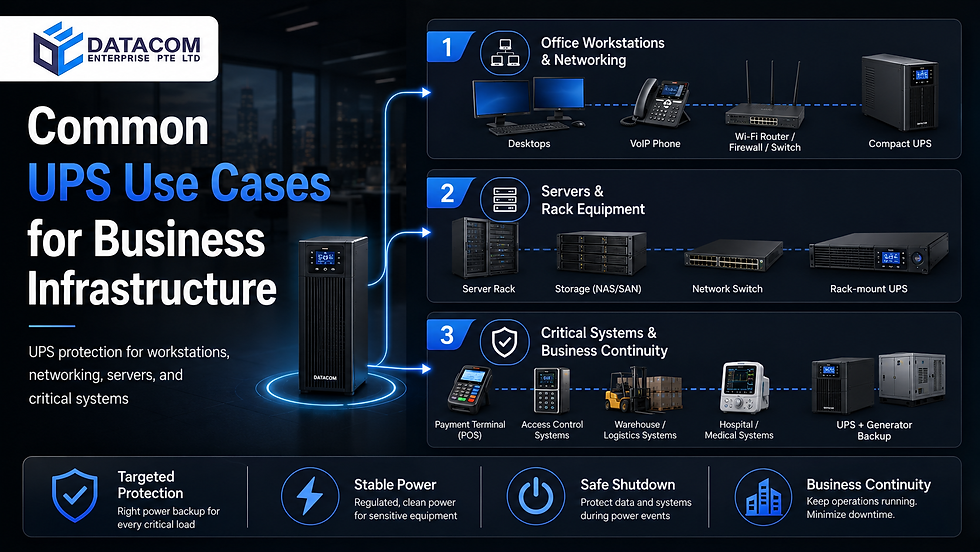
Different parts of the IT environment carry different uptime and runtime requirements. UPS protection can be dedicated per device group — workstations, networking, servers, and peripherals — depending on criticality.
Office Workstations and Networking Devices
A typical office includes desktops, VoIP phones, Wi-Fi routers, and access points. For a 10-seat Singapore office, a practical configuration might include:
1 × 1,000 VA line interactive UPS for the router, firewall, and core switch
2–3 × 600–800 VA units for key workstations
Protecting the core router, firewall, and switch delivers more value than protecting every single PC, because those networking devices keep cloud applications accessible for the entire office. Look for models with an integrated surge protector and a user-replaceable battery for simpler maintenance.
Servers and Rack Equipment
Rack environments typically house servers (300–900 W each), storage arrays, virtualization hosts, and core network switches. The systems supporting that equipment need stable, uninterrupted power.
Most modern UPS units in rack environments, especially enterprise-grade models, include a battery charger with precision charging algorithms that extend battery life and optimize performance over repeated discharge cycles. Where power protection is part of a broader infrastructure rollout, businesses may also review server rack solutions.
Critical Systems and Business Continuity
Critical systems may include warehouse management servers, hospital systems, payment terminals, and access control readers, among others. These devices may need higher runtime targets and should be connected to UPS systems coordinated with building generators for extended outages. Treating business power backup as part of continuity planning — rather than an afterthought — is what separates a brief inconvenience from a costly disruption.
Networked smart UPS deployments can signal servers to safely shut down and trigger failover procedures in under 60 seconds. Consider a logistics hub that is able to continue its shipping operations for 30 minutes during a grid failure because of its UPS infrastructure. Proper planning can prevent costly interruptions to time-sensitive operations.
Why APC UPS Solutions Are Commonly Considered
APC, a Schneider Electric brand, has long been a widely adopted choice for UPS solutions in business IT environments, including across Singapore. The APC Smart-UPS line includes both line interactive and online models with features such as intelligent battery management, boost and trim automatic voltage regulation (AVR), and strong surge protection for connected equipment.
APC systems are commonly used to protect servers, POS terminals, and network devices across businesses of all sizes. For a broader overview of the range, see our APC UPS guide. For detailed model comparisons, pricing, and availability, visit the APC UPS products page.
How DATACOM Supports UPS Planning and Deployment

DATACOM offers comprehensive support for businesses selecting and deploying UPS power supplies tailored to their IT infrastructure needs. Our experienced team works closely with clients to assess total equipment load, runtime requirements, and environmental conditions, ensuring the right UPS topology and capacity are chosen.
We provide expert guidance on integrating UPS units with existing server racks, networking equipment, and critical systems such as access control devices. DATACOM also assists with future scalability planning, recommending modular solutions and external battery packs to accommodate growth.
Beyond UPS selection, DATACOM provides end-to-end support covering installation, configuration, and ongoing maintenance as part of our broader IT support services. This includes battery health monitoring, performance checks, and replacement scheduling to ensure long-term system reliability.
Partner with DATACOM for trusted UPS brands like APC and expert guidance across integrated backup power for IT infrastructure tailored to your business continuity needs.
Frequently Asked Questions About UPS Power Supply Selection
Below are concise answers to common questions about UPS sizing, maintenance, and integration.
How do I size a UPS for a small home or remote office? List essential devices — router, modem, small switch, one PC or laptop dock — and total their wattage. Prioritize networking gear to keep cloud apps and VPNs online during outages. A qualified provider can help you select the right UPS size and runtime.
What size UPS do I need for a small server room? Total the nameplate wattage of your servers, storage, and switches, add 20–30% headroom, then match that figure against UPS capacity ratings. A small room running 1,000–1,600 W of equipment typically needs a 2,200 VA rack-mount unit; larger rooms may need 3,000 VA or above, or a modular system.
How often should UPS batteries be replaced? Sealed lead-acid (VRLA) batteries last about 3–5 years under normal temperatures but less in cramped, hot spaces. Lithium-ion batteries last 8–10 years with better heat tolerance. Schedule preventive replacements and runtime tests before failures occur. Log installation dates for critical setups.
Can a UPS replace a generator for long outages? No. UPS systems provide short runtimes (minutes to an hour) and bridge power until generators start (10–30 seconds). For extended outages, coordinate generator and UPS integration so batteries cover only startup intervals.
What is the difference between a UPS and a surge protector? Surge protectors only clamp voltage spikes. UPS units add battery backup with regulated output, voltage regulation, and power conditioning. For critical IT infrastructure, a UPS is the better choice.


Comments